Installation
Reef Register is a plug-n-play point of sale built to be as easy to install as it is to use. Below you'll find the instructions for installing your new register.
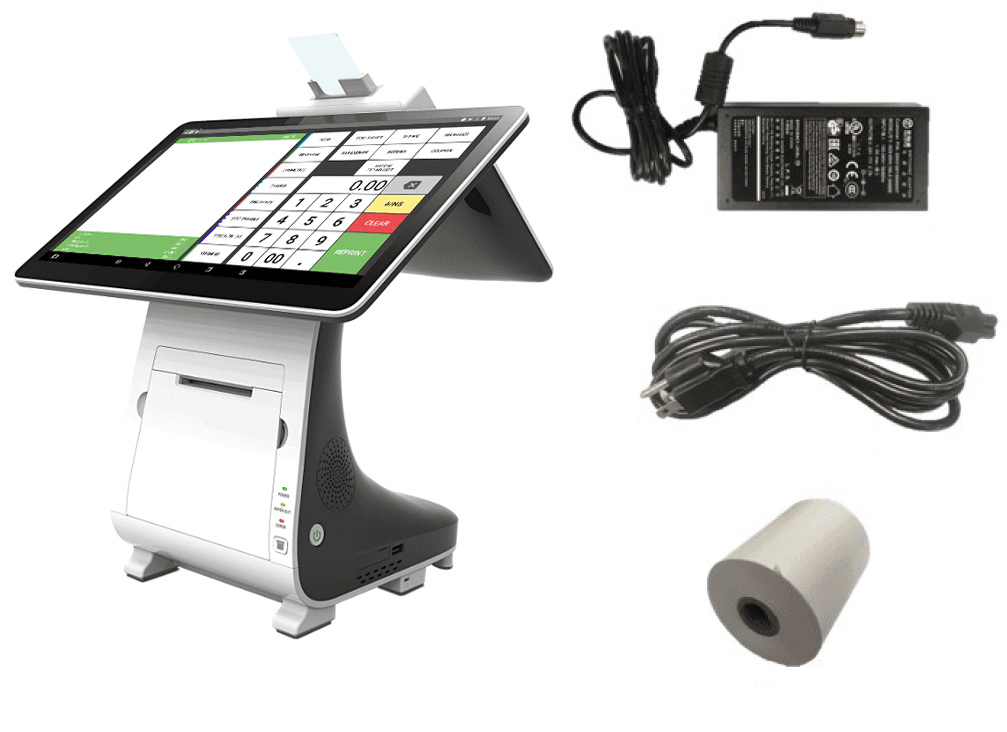
- Unbox the device. The PAX E800 box contains:
- E800
- Power Adapter
- Power Cord
- Thermal Paper Roll (May already be inserted in the printer.)
- Plug the power cord into the power adapter. On the back of the stand, open the back cover to reveal the device's ports. Plug the cord into the port labeled Power, at the bottom left. If using a cash drawer, plug the cash drawer cord into the port labeled Cash Drawer. Make sure the end of the cord connected to the E800 is labeled Printer and the end labeled Cash Drawer goes into the cash drawer.
- Turn on the E800 by pressing the power button located on the right side of the device.
- If the paper hasn't been loaded into the printer, open the external printer cover by pulling away from the printer with your fingers in the notches to the left and right of the door. Open the built-in printer cover by pressing the orange spring key. Remove any old paper spools and insert the paper roll with the end facing up and extending out of the E800. With the paper placed, firmly press and close the built-in printer cover. Close the external paper cover.
- Connect to the Internet:
-
WiFi:
- Select the settings icon at the bottom of the screen (gray gear icon).
- This will prompt for the password: 9876.
- Select WiFi and make sure WiFi is turned on with the toggle switch. There should be a list of networks. Find your network and select it, entering any passwords it prompts. Select Connect.
- Once connected, select the middle circle button on the bottom bar. This will bring you back to the E800's home screen.
-
Ethernet:
- Connect an active ethernet cable to the WAN port in the back of the device.
- On the E800 screen, select the settings icon at the bottom of the screen (gray gear icon) and enter the password: 9876.
- Select Wireless & Networks > More > Ethernet. Enable ethernet in the upper right corner of the screen. Once connected, select the middle circle button on the bottom bar. This will bring you back to the E800's home screen.
-
- On the home screen, select the Reef Register icon. Reef Register is now ready to use!